


Doing the Full Ubuntu
This is a tech post. If this isn’t your thing, click away now.
Furthermore, this is not just a tech post, but a personal musing on my own personal tech. So if you don’t want to hear me talking about my own computers, definitely click the heck out of here.
But in the end, I arrive at a sound and reasonable argument for switching your operating system to Linux. So if you are the sort of person who has not yet switched to Linux but might eventually be plied, or are at least interested in what sort of argument may or may not get you there, then read on.
- Time to Change the OS Oil
My Dell Inspiron 6000 laptop recently encountered a new string of problems. Something to do with deprecated video games install procedures and a resulting fatal error with Direct X that could not be fixed even with some registry noodling and several complete re-installs. So, I was going to at least be re-installing Windows XP to fix video.
Which I’m fine with, because the computer is 5 years old and never had an OS re-install, even through a replaced motherboard, a new screen, and all of the abuse that the system has taken. This is pretty typical for the computers in the house. I like fixer-uppers, and have always been frustrated by people who lose a DVD drive or mess up their Wifi settings and go buy a brand-new computer. Computers are so easy to fix these days, and while my 1.75 Ghz Dell isn’t fast, it totally gets the job done. In addition to the Dell, we have a old AMD machine Frankensteined from spare parts that is our NAS server (running Openfiler, a NAS-centric Linux distro), a sub 1-Ghz Dell box “rescue dog” I use for testing hardware, my partner’s old G4 Powerbook running OSX 10.4, and her new EEE PC that is hers and that I’m not allowed to mess with. Because I like to screw around with computers, even if I don’t always know what I’m doing.
So, why I was digging out the OEM discs that amazingly, I saved through 3 moves, I thought: hey, I’ve always wanted to try out Ubuntu on a primary machine. What better opportunity than now to try a dual-boot with XP? I always back up my data on the NAS, and I’m going to F-disk the laptop anyway. The worst thing that happens is that I have to start from scratch twice. I’d heard good things about the latest version of Ubuntu, 10.04 (Lucid Lynx). So let’s start another nerd project, shall we?
So, two weeks in, here are my reflections on this experiment.
- A Free Operating System
All the sources say to install your XP first, and then Ubuntu, because XP’s boot loader will wipe out Ubuntu’s if done the other way around. So I installed XP from the OEM disc. Took 20 minutes or so.
Let me tell you, there is NOTHING there. NOTHING works. No hardware drivers, no programs. No internet connection, because XP will not natively work with my network cards. I see a field of grass and a blue sky, and that’s it. There should have been a separate disc from Dell that had all of this stuff on it, but I lost that one. So I was looking at a very nice desktop, but nothing else, until I retrieved the drivers from another machine and brought them via a USB key to this machine, and managed to get on the Internet.
It is very interesting to have a computer with no functional Internet connection. Kind of like being on a deserted island. Anything that you will need to fix your Internet connection, you will have to get online. A computer without an Internet connection isn’t really a computer these days; it’s more of a calculator with a large memory. You can enter data into it, but it isn’t going anywhere or doing anything other than bouncing around. The only programs that you can load are programs you enter into it, manually, as it were. Especially when a program requires update X or other utility Y, because you are not just clicking OK, download/install, you are taking a USB key across the house to the other computer, finding and downloading executables on the Internet, bringing them back, and then installing, finding you need something else, and going back again. Kind of like fighting a fire with a one person bucket brigade.
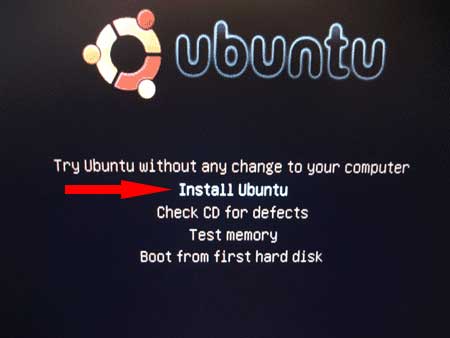
So I decided to leave XP alone for a while, and try out Ubuntu. I’m not going to lie and say it was seamless–I actually had to install it twice. The first time I installed 9.14, and then upgraded to 10.04 via download. But, I accidentally shut down the computer while it was upgrading. It finished after I started back up, and seemed to work at first, but then started crashing and dropping network connections. Also the software update utility got confused, and rolled back a lot of updates. So I reinstalled the whole Ubuntu partition with 10.04 from a mounted USB drive. The second time, when some idiot didn’t unplug the computer, it worked perfectly. So I chalk that first try up to (serious) user error.
The first thing I noticed when I booted up Ubuntu for the first time (correctly) is the thing no one else says about Ubuntu, and it’s best trait. Not that it “just works”. Not that it actually looks good. Not that it comes with drivers and software pre-installed.
It is a free OS. And this means that you get all of the above.
Here’s what I mean. I updated my iPhone 3G to iOS 4, and got many problems, along with the rest of the world, because the software update was meant for the new hardware Apple was selling, not my 2-year old piece of smart phone trash. It was, in a sense, backported to my hardware with limited features and many flaws.
When I re-installed XP, the operating system I paid for with my computer, it was almost unuseable. This is because it was designed to be sold by an OEM, in this case, Dell. Dell would sit with my computer, and make sure the network cards had drivers, install relevant or useless software for me, and basically turn the bare bones of XP into a usable operating system for a consumer.
However, Ubuntu neither makes a free OS as a way of selling hardware, nor sells their OS to hardware manufacturers and distributors, who are responsible for hooking up all the leads. Ubuntu produces a free OS, meant to be downloaded and installed on any and every (pretty much) computer out there. It is a complete package, and must be. It is complete because it is a product, albeit a free product, on its own. It can only be on its own as a product, because it is free. (The only people who sell versions of Linux sell it tied to service or hardware).
Additionally, Canonical (the people who organize and distribute Ubuntu) make a substantial release every six months. Among other reasons, they do this to keep it fresh, and to keep it updated, and to keep it: canonical. When I finally got my drivers and connected XP to the Internet, it took five reboots and OVER NINETY DOWNLOADED UPDATES until XP was “current”. Those are serious updates, that fix security flaws or other operational problems. But all I had to do for Ubuntu was to install the current version. One version to improve them all: canonical. Apple makes their software the same way–you install the new OS version. Except that it fucks up your phone as a surreptitious way of convincing you to buy new hardware, or in the case of our G4 Powerbook, we CAN’T install a new version. Not without paying for it.
But Ubuntu is a free OS. So every six months, you are installing a brand-new OS, that is complete. In my opinion, this is the predominant reason that opens-sourced OS, in this sort of canonical distribution format, will eventually displace other OS. The universality and the completeness can’t be beat. Imagine, for example that every person who has a new car, has a closed OS–but every person who has a used car runs Ubuntu. Most people own new computers. But when there is an alternative, there will be drift. Ubuntu is that complete functional alternative. It represents the possibility of a used car market. For me anyway, it saved me buying a new laptop.
- Free Software
Along with the canonical distribution system, comes the wealth of free software. Again, this is much more than the simple “it just works” tag line. Yes, there is software pre-installed. But there is also a lot of software that is easy to get. And it is easy to get in a way unlike any other OS.
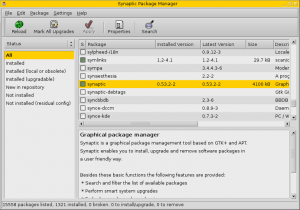
I first tried Ubuntu a little over a year ago, and as a noob, I didn’t really get the Synaptic Package Manager. I think many Ubuntu users take it for granted. But it’s brilliant. If you’ve ever installed software on a Mac, its similar, at least in principle. All software comes in pre-recognized packages, and then this package is mounted and automatically installed. But Synaptic Package Manager makes it super easy. Because all the software is free, it can be accessed via various “Software Sources”. You plug in your Software Source, not unlike adding an RSS feed to a aggregator, and then via the Package Manager you can search and install software with a couple of clicks, without dragging anything to the desktop, without mounting anything, and without having to come back and look for individual updates. The Update part of the Package Manager lists all of your software, and automatically check for what updates are available, and checks if anything has been made unusable by OS updates.
It’s reminiscent of an app store, and even more so with the most recent Ubuntu release, which actually has a software browser designed like an app store, listing all software you could possibly download in categories by function, (music, utilities, etc) with screen shots and descriptions. No reviews yet. But did I mention it is free? And with the Package Manager, trying new software is as easy as plugging in a pair of headphones. None of that Windows registry garbage, piling up traces of old programs, slowly junking up the system. As far as I know, anyway. I tried just about every music player program available for Ubuntu trying to find the one I liked best, because I’m finicky like that (Media Monkey, please go to Ubuntu! Best music player UI, IMO).
And there are replacement possibilities for just about everything. Before re-installing Windows, I made a list of every program I used. I already used Open Office in XP. I do miss Media Monkey, but mostly because of the UI. Rhythmbox is totally equivalent (and better) than iTunes. You can even buy music in Rhythmbox. VLC is equivalent to any video player. Some people say better. I used Firefox and Chrome in XP, I use them both in Ubuntu. Evolution email looks comparable to Outlook, but I stick to web apps for stuff like that regardless. I used Picasa in XP, I use it in Ubuntu. Haven’t tried GIMP for image editing yet.
Things I can’t use in Ubuntu include games, Adobe CS, and iTunes. But this is why I set up the dual boot. Which was easy, by the way. Ubuntu will automatically set up a boot screen giving you the option of Ubuntu or Windows when installed in a partition separate to another OS install. Even so, the only times I’ve been in the XP partition over the past two weeks have been to do chores, trying to get XP working. Day to day computer use (web, video, music) has all been comfortable and seamless in Ubuntu.
- Hardware
I already compared the driver experience in Ubuntu to a fresh OEM install of XP. I’d say that Ubuntu is in full bloom when it comes to hardware support. Almost everything works automatically, because they’ve swept up most drivers and put them into the canonical distribution. There are still rare exceptions, that take some custom tweaking to make it work (though you CAN make it work, if you spend the time, whereas with other systems, if it doesn’t work, you are SOL). Everything I’ve read by tech-folks say that Ubuntu is over the hump as far as hardware support goes. Ubuntu is big enough, and there are enough people working on it, and enough hardware manufacturers are freeing up the documentation that the vast majority of stuff you would plug in to your machine works already, and the rest is getting roped in.
Performance is a little slower. Just a little. I notice a little bit of difference in video playback between the former install of XP and Ubuntu. I may need to tweak a setting on the video codecs. Or, it may be that I run too many intensive processes simultaneous (I’m always converting media file formats, or ripping discs, or something). Or it might just be that my video card is five years old, and my processor is only 1.75 Ghz. Anyway, it is more than serviceable for restoring an old computer, and probably perfect on a computer with some better stats. And everything other than the video is perfect–even the hardware accelerating desktop effects (rubbery windows when you drag ‘em around) works seamlessly.
There is one hardware accessory that I can’t get to work correctly, but I’ll talk about that next.
- Freegan Ire
I’ll come right out and say yes, I have a certain political support for open-source. I am that sort of techno-anarchist, and kind of a tinkerer with computers. And generally anti-capitalist. But aside from all that, I like my technology to work. I waited in line to buy an iPhone 3G, because I knew it was going to be good. I like technology that does things, and does them well.
So I like Ubuntu, because it does things well. And while it might be my bomb-throwing freegan ire that makes me angry at hardware manufacturers that specifically spurn open-source, it is also my sense of quality. Ubuntu is a viable OS, and a widely-used product with a history and a future. It should be treated as such.
So when my iPhone refuses to sync music with Ubuntu, it makes me angry. I waited in line to buy this thing, because I knew it was a good product. But because Apple makes it so you MUST manage media content via iTunes, and because they ONLY make iTunes for Windows and Mac, and because the phone WILLFULLY refutes attempts to access its media content from other programs, they are giving all Ubuntu users the finger.
Okay, I know the phone is not willfully doing anything. But it seems that way. With Rhythmbox you can, supposedly, sync music to the iPhone. Ubuntu mounts the iPhone, it shows up in Rhythymbox, and I can even drag music to the icon, and music will transfer to the phone. I know it is on the phone, because if I open the mounted file system of the phone, I can see the music files. But they will not be visible on the phone via the iPod. It has something to do with a file called iTunes.sync.lock or something like that, because taking advice from the Internet, I deleted that file from the phone, and then music synced perfectly, just like it had been put there with iTunes. But then, the phone restored that file with no input from me. All the music that had been visible via the iPod disappeared, even though it is still on the phone’s file system.

Although my technological knowledge is limited, I can only assume that Apple is purposefully making it difficult to access the phone media via anything other than iTunes. I take as evidence the fact that there are no other programs, open source or not, for ANY OS that will sync to an iPhone. You can sync to iPods and to other media devices, using any number of programs, but not iPhones. It is not a straight-up incompatibility, because I got it to work, at least for a time. But the phone disabled that syncing ability, even after it was already working.
Anyway, I’ll cut it short and say I’m pissed, and this is the first time I’ve ever seriously thought about rooting my iPhone, and one more brick in the wall of my-next-phone-will-be-Android. (Not because an Android phone works better with Ubuntu/Linux, but because an Android phone works WITHOUT iTunes.) Also, there is a saving grace to this problem, which is the next section. I have faith that the legions of the Ubuntu volunteer tech-support and development will eventually crack the iPhone, and make it work. Because they are my heroes.
- Service
There are many companies that have a successful business model in providing service for Linux. And why not? If you are a business, why not take all the money you would spend on software without support, and invest it in great support for free software? With the customization available with Linux, it seems like a no-brainer for any small business with specific IT needs.
But even for us rage-filled freegans, the service aspect of Ubuntu is fantastic. I, and perhaps you, are members of the Google age. When we have a problem, the Internet solves it. And when it comes to computer questions, and moreover, OS questions, there is no better, bigger, and more searchable repository of knowledge and volunteers than Ubuntu Forums.
The reason of course, is because Ubuntu is volunteer made. Without these contributors, it wouldn’t exist, or have evolved to be a reasonable OS alternative for casual/power users like myself. Ubuntu has needed these people to make it usable, and now they are a free resource that comes along with a great OS. I’ve never once had to ask a question on the forums, because by searching I’ve found every question I’ve ever wanted to ask not only already asked but answered. Ever have any luck finding something in Microsoft Knowledge Base? Yeah.
Now, this isn’t to say it is a total breeze. If you want to use Ubuntu, or any form of Linux, you should be prepared to lift the hood. No, you don’t have to, but you probably will want to. And for the inexperienced user, the notion of a command line is kind of intimidating. But that was me a year ago, and now the command line is easy for anything I need it for, which is almost nothing. Every program I have ever wanted to use has a GUI, and you don’t even need the command line to install programs anymore thanks to Synaptic Package Manager, as I already mentioned. If you have ever, for any reason, typed a DOS command, then you are more than prepared for the shell command line. Ever typed ipconfig in the Run Line of Windows? Then you get the concept.
It’s actually kind of nice, because (and this was the original idea) if you are an advanced enough user that you should be screwing with system settings, you can easily do it, but if you ought to be calling your friend/child/neighbor/polytheistic deity to do it, then you won’t be able to. The GUI desktop gives a nice place to mess around. If you are going to venture into territory in which you should probably be reading an article first, you are forced to do so. And these articles are freely available, which is amazing. Want to compile Python programs from the command line? Free article. Want to install a driver that doesn’t exist that someone made from scratch? Read a free article, and you are good to go. Sometimes you must read an article, because otherwise you won’t know how to do something. For instance, did you know that once you load Ubuntu for the first time, it will not play a DVD from the drive? Because the CSS decryption can’t ship with the install, for legal reasons. I Googled “Ubuntu 10.04 DVD won’t play”, and then I found a tutorial on how to make it work with two command line entries. Bam. I am l33t hax0r, and you can be too.
So it’s not entirely simple, but it is that close to simple. Let’s put it this way–if you read a blog post about literature (assuming that you do read blog posts about literature) and read about an author you’ve never heard of before but sounds interesting, and then Wikipedia that author and find out that s/he does indeed sound interesting, and then make yourself a note to visit the library and put a copy of said author’s book on reserve, and then actually go and do this regardless of whether or not you end you reading the book when it arrives–if you can abstract on your interest thus far, they you are more than capable and have the natural inquisitiveness to be able to hack Ubuntu to your power-user satisfaction.
Furthermore, even though I hate it when people (Cory Doctorow) proclaim it like a trademarked slogan, Ubuntu does “just work”. Not with DVDs. But with everything else. It actually does, to the point where I hope it never has to be argued again.
- Conclusions
None. That’s it, those are all the thoughts I’ve had. You’ve heard the full story, as I experienced it. I love Ubuntu, and I’m converted. It’s much better than I imagined, and no more difficult than XP in the long run. As long as this laptop continues to work, my next new computer will be a netbook only running Ubuntu. Hopefully with multi-touch and great battery life (crossing fingers/waiting on the hardware). Such a netbook would totally sap any small desire I’ve ever experienced for a iPad. Hell, even without the multi-touch screen it would. That’s just icing on the cake. When you can download any software for free in an App Store like UI, tweak as much as you want or need, and play any type of file that has been invented, and use a full keyboard, what exactly does an Apple device offer? Cover flow?
That’s off topic, but I make the comparison because I think Ubuntu is the new brilliant light in the tech world, and where I see the most opportunity. It takes the throne the iPhone held for me two years ago, before it got bogged down by an all-gloss OS, the ball and chain of iTunes, and Apple’s hardware sales schedule. There is a lot of opportunity in Ubuntu. If, like the App Store, developers really take to Ubuntu program distribution model, it could do to personal computers what the iPhone did to smart phones. That’s no guarantee, but the material infrastructure is there.
No other conclusions, because if you aren’t already the sort of person to try Ubuntu, then reading these 3800 words (I know) won’t change your mind. But if you are the sort of person who likes to learn about the tech you use, then try it. If you are the sort of person who likes to tweak and customize, and doesn’t mind a little experimenting, try it. If you are the sort of person to try it, and you haven’t yet… then now is totally the time.
Categories: Ballast
Tags: technology, theory, words
Comments: 1 Comment.
Nice review. Good to see more folks coming over to the Brown Side ;)